ATX vs Micro-ATX vs Mini-ITX: Which Motherboard Should You Choose?
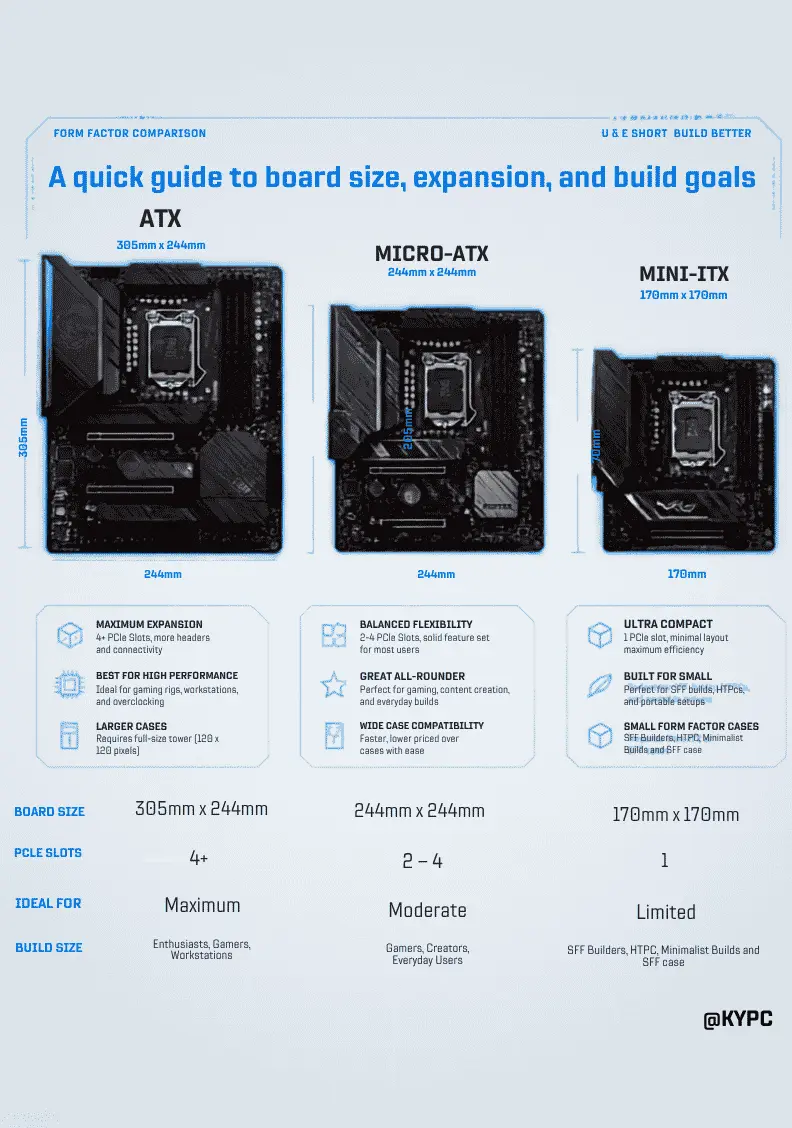
When building a PC, choosing the right motherboard is essential. The three most common motherboard form factors are ATX, Micro-ATX (mATX), and Mini-ITX. Each offers different sizes, features, and expansion options depending on your needs.
ATX Motherboard
ATX is the largest and most feature-rich motherboard form factor. It usually includes four RAM slots, multiple PCIe expansion slots, several M.2 SSD connectors, and better cooling support. ATX boards are ideal for gamers, content creators, and users planning future upgrades.
Pros
- More PCIe slots
- Better cooling
- More storage options
- Easier cable management
Cons
- Requires a larger PC case
- Generally more expensive
Micro-ATX Motherboard
Micro-ATX is a smaller version of ATX while still offering excellent performance. Most Micro-ATX boards come with four RAM slots and enough expansion options for gaming and everyday use. They are a great balance between price and functionality.
Pros
- Affordable
- Compact size
- Supports most gaming components
- Fits in smaller cases
Cons
- Fewer PCIe slots than ATX
- Slightly fewer connectivity options
Mini-ITX Motherboard
Mini-ITX is designed for small form factor (SFF) PCs. These motherboards usually have two RAM slots and one PCIe slot, making them perfect for compact gaming or home theater PCs.
Pros
- Very compact
- Low power consumption
- Perfect for small PC builds
Cons
- Limited upgrade options
- Fewer storage and expansion slots
- Can be more expensive than Micro-ATX
Comparison Table
| Feature | ATX | Micro-ATX | Mini-ITX |
| Size | 305 × 244 mm | 244 × 244 mm | 170 × 170 mm |
| RAM Slots | 4 | 4 | 2 |
| PCIe Slots | 3–7 | 2–4 | 1 |
| Best For | High-End Gaming | Budget Gaming | Compact PCs |
| Upgrade Options | Excellent | Good | Limited |
| Price | High | Medium | Medium to High |
Which One Should You Choose?
- Choose ATX if you want maximum performance, multiple GPUs or expansion cards, and better future upgrades.
- Choose Micro-ATX if you need the best value for gaming and everyday computing.
- Choose Mini-ITX if you want a compact PC that saves space without sacrificing too much performance.
Conclusion
ATX, Micro-ATX, and Mini-ITX motherboards all deliver excellent performance, but the right choice depends on your budget, PC case size, and upgrade plans. For most users, Micro-ATX offers the best balance of price and features, while ATX is ideal for enthusiasts, and Mini-ITX is perfect for compact builds.